Features

Everything OnMiles does for you.

Automatic trip recording, a complete mileage log, on-device intelligence that sorts Work from Personal, and the tax tools that turn miles into money. All in one app, with no account.

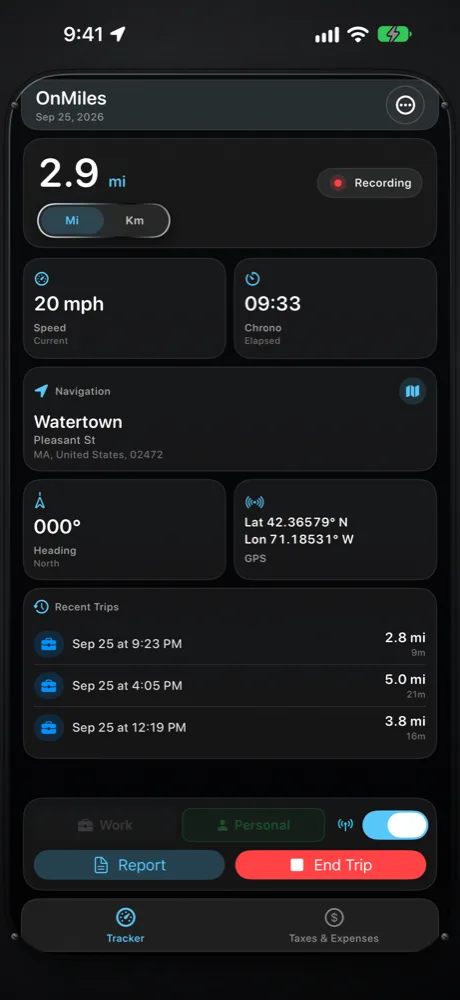
OnMiles dashboard recording a trip automatically

OnMiles in 45 seconds.

Dashboard showing a trip being recorded: distance, speed, elapsed time and location

Automatic tracking

Starts when you drive. Stops when you park.

OnMiles watches for driving in the background and records the trip on its own. You never press Start, so you never forget.

  • Hands-free start: recording begins once you are moving at driving speed, even with the app closed and the screen locked.
  • Automatic end: after a few minutes parked, the trip closes. The parked minutes don't count toward its time.
  • Starts where you parked: when you leave the spot where your last trip ended, the new trip begins right there, so the first stretch isn't lost.
  • Trip recorded: a notification with the miles, time, type and route when you arrive, or one daily summary if you prefer fewer alerts.
  • Live Activity: the miles so far and elapsed time on the Lock Screen and in the Dynamic Island while you drive.
  • Live dashboard: distance, speed, elapsed time, heading, address and GPS position at a glance.
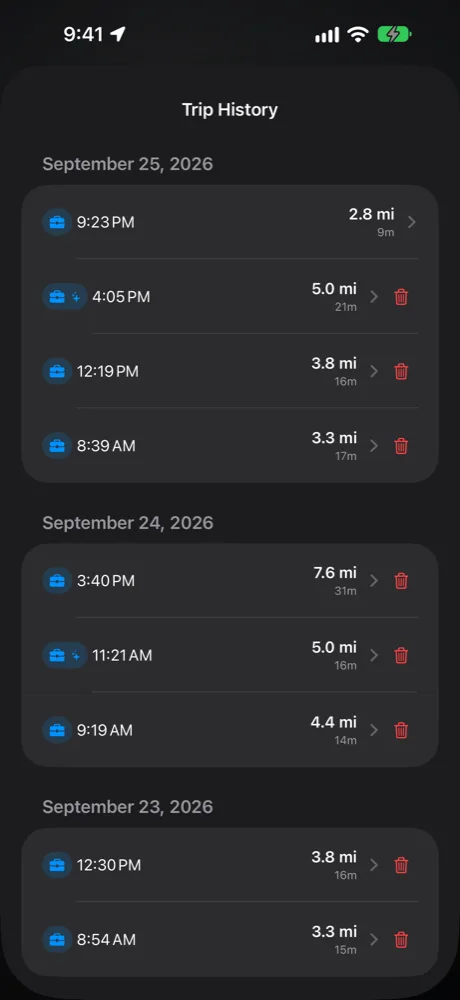
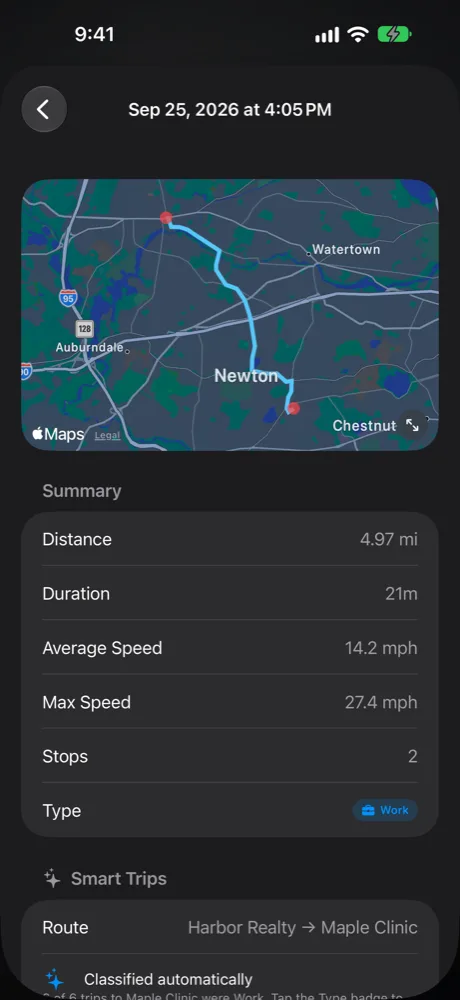
Trip History grouped by day Trip detail with the route on a map and a summary

Trips & history

A complete record of every drive.

Every trip keeps the details a mileage log needs, and the history stays easy to review.

  • Route on the map: the path you actually drove, with start, end and stop markers, full screen when you need a closer look.
  • Stops with addresses: each stop's street address, time and how long you were there.
  • The numbers: distance, duration, average and top speed.
  • Business purpose: type it once or pick a suggestion.
  • History by day: reclassify a trip in one tap, or delete a single trip without touching the rest.
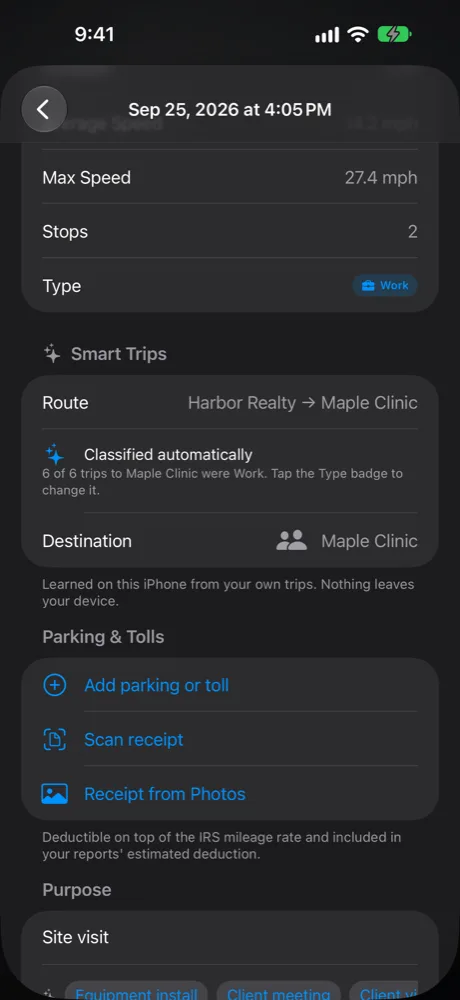
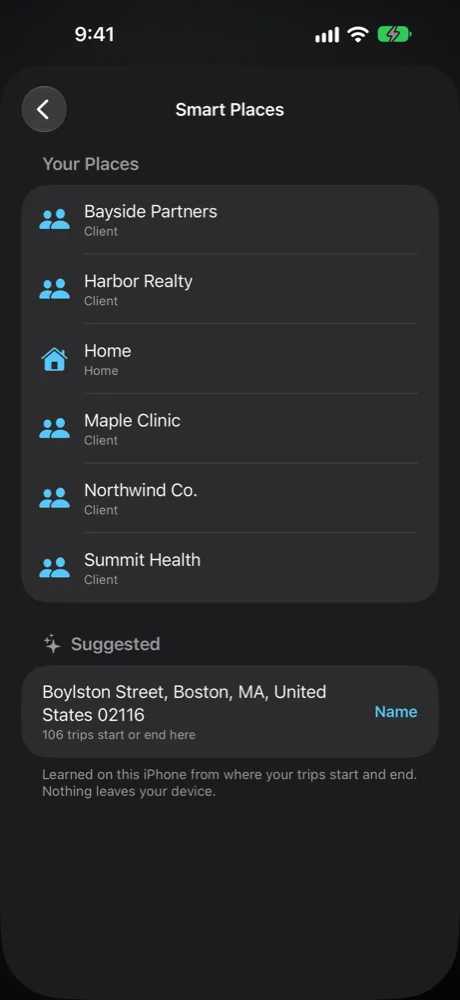
A trip classified automatically: 6 of 6 trips to Maple Clinic were Work Smart Places: named places and a suggested place

Smart Trips · on-device AI

It learns your routine, and tells you why.

OnMiles learns from your own trips, entirely on your phone. No cloud and no account: nothing leaves your device.

  • Automatic Work or Personal: trips to places you drive to regularly are classified for you when OnMiles is confident, with a ✨ mark.
  • Always explained: the trip shows the reason, such as "6 of 6 trips to Maple Clinic were Work", and one tap changes it.
  • Suggestions when unsure: "Looks like a Work trip", with an Apply button, instead of guessing.
  • Smart Places: OnMiles notices where your trips start and end. Name them once (Home, Office, a client), and trips read like "Home → Northwind Co."
  • Purpose suggestions: one-tap purposes you've used before at the same place, plus starters for your kind of work, such as Showing, Patient visit or Deliveries.
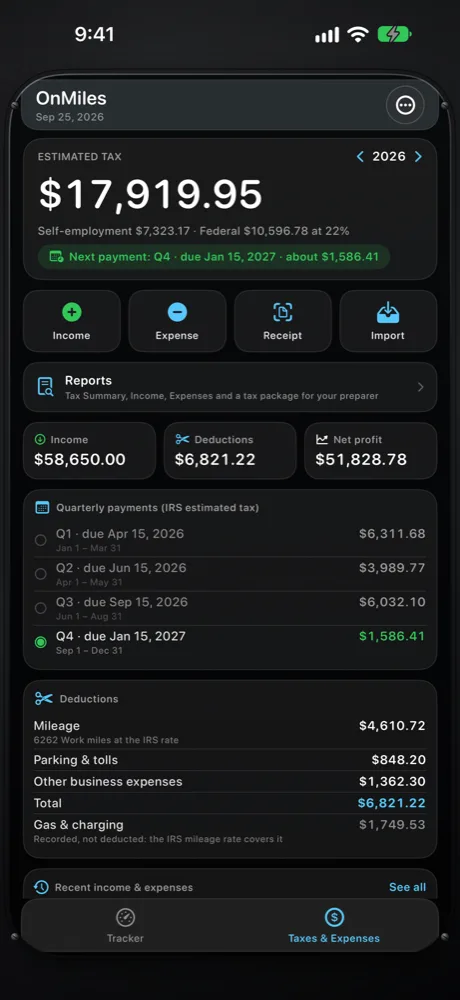
Taxes & Expenses tab: estimated tax, quarterly payments, income and deductions

Taxes & Expenses

Your mileage, income and taxes in one place.

A dedicated tab puts your estimated tax up front, with one-tap Income, Expense, Receipt and Import.

Money in and out

  • Log income and business expenses
  • Add parking and tolls to a trip; they're deducted on top of the mileage rate
  • Categories for parking, tolls, supplies, phone, gas and more
  • Gas is tracked but not deducted, because the mileage rate already covers it

Less typing

  • Scan a receipt: the total, date and merchant are read on your phone, and the photo isn't kept
  • Import bank and card statements (PDF, CSV, OFX, QFX) without sharing your bank login
  • OnMiles checks that transactions add up to the statement balance
  • Duplicates across statements are imported only once

Tax planning

  • Estimated self-employment and federal tax for the year
  • Each IRS quarterly payment, with a reminder a week before it's due
  • Standard mileage rate versus actual car costs, to see which deducts more
  • Tax Summary, Income and Expenses reports; see Reports

CarPlay

Key trip details in your car.

On supported vehicles, OnMiles shows trip status, odometer distance, speed and basic controls using Apple's CarPlay templates, designed to be read at a glance.

Your preferences

Set it up your way.

Miles or kilometers, GPS accuracy (High, Balanced or Battery Saving), background tracking, notifications, mileage rate, Smart Trips auto-classify, your kind of work, and driver and vehicle details for report headers.

Privacy & backup

Your records stay yours.

OnMiles is local-first. There is no OnMiles account and no OnMiles server holding your trips.

Read the Privacy Policy

No account

Open the app and drive. Nothing to sign up for, no password to lose.

No ads

No advertising and no tracking across other apps or websites.

On your phone

Trips, places, income and expenses live in the app's database on your device.

Backed up by your phone

Included in your iCloud or computer backup, so they come back on a new iPhone. Export CSV anytime.

Platforms

iPhone today. Android on its way.

OnMiles is on the App Store for iPhone, with CarPlay. The Android version, with the same features, is coming to Google Play.

One-time purchase

Every feature. One payment. No subscription.

Download on the App Store